> For the complete documentation index, see [llms.txt](https://docs-shpf.bsscommerce.com/b2b-wholesale-solution/llms.txt). Markdown versions of documentation pages are available by appending `.md` to page URLs; this page is available as [Markdown](https://docs-shpf.bsscommerce.com/b2b-wholesale-solution/advanced-settings/display-discounted-prices-as-msrp-on-checkout-page.md).
# Display Discounted Prices as MSRP on Checkout Page
Choose how B2B discounts appear at checkout: show the discounted price as the item price (MSRP), rename the discount line, allow Shopify discount codes and tag the app's orders.
When a cart has a B2B price or rule (for example from Custom Pricing or Volume Pricing), B2B Solution creates the checkout for the customer. The **Shopify checkout settings** page controls how that checkout looks. The best-known control is **Price override**, which decides whether the discounted price is shown as the item's own price (MSRP) or as a separate discount.
## Where the settings are
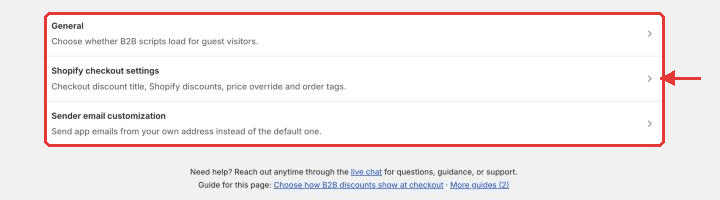
Global settings live in one place: **Settings** in the app sidebar. Open it and you see three rows, each opening its own page with a **Back to Settings** link:
| Row | What it holds |
| ------------------------------ | ------------------------------------------------------------------------------------------------------------------------------------------------------------------------------------------------------------------------------------------------------------------------------------------------------------------ |
| **General** | **Optimize B2B script loading**: load B2B scripts only for logged-in customers. It is **Disabled** by default. When you turn it on, a warning explains that rules targeting guests do not run for visitors who are not logged in. The **Registration Forms** and **Multi Currency** scripts still load for guests. |
| **Shopify checkout settings** | Checkout discount title, Shopify discount, Price override and Order tag (this page). |
| **Sender email customization** | Send app emails from your own address. See [Email Sender](/b2b-wholesale-solution/advanced-settings/email-sender.md). |
{% hint style="info" %}
Developer settings that used to sit here (CSS selectors for prices, custom CSS, registration form notes) now live inside each module, in its **Theme settings** section. For example, open **B2B customers › Registration Forms**, click **More actions** and choose **Theme settings**. See [Navigate the app](/b2b-wholesale-solution/getting-started/navigate-the-app.md) for how module headers work.
{% endhint %}
Settings page with General, Shopify checkout settings and Sender email customization
## Open Shopify checkout settings
1. In the Shopify admin, open the B2B Solution app.
2. Click **Settings** in the sidebar, then click **Shopify checkout settings**.
3. Change the cards below and click **Save** in the save bar. Save stays disabled while the order tag has an error.
These settings apply store-wide to the checkouts and draft orders B2B Solution builds when a B2B rule applies to the cart. A cart with no B2B rule goes to the normal Shopify checkout. They are not per-customer or per-product.
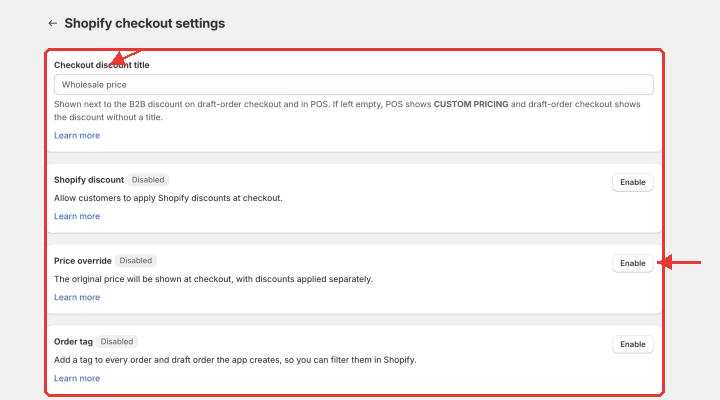
Shopify checkout settings
| Card | Control | What it does |
| --------------------------- | ------------------------------------------------------ | ----------------------------------------------------------------------------------------------------------------------------------------------------------------------------------- |
| **Checkout discount title** | Text field | The label shown next to the B2B discount at checkout and on the B2B Price tile in Shopify POS. Empty: checkout shows the discount without a title and POS shows **CUSTOM PRICING**. |
| **Shopify discount** | Badge + **Enable / Disable** button | "Allow customers to apply Shopify discounts at checkout." **Disabled** by default. |
| **Price override** | Badge + **Enable / Disable** button | Enabled: "Show discounted price as original price on item at checkout." Disabled: "The original price will be shown at checkout, with discounts applied separately." |
| **Order tag** | Badge + **Enable / Disable** button, then **Tag name** | Adds one tag to every order and draft order the app creates, including manual orders, so you can filter them in Shopify. |
{% hint style="info" %}
**Shopify discount, Price override and Order tag are buttons, not switches.** Each card shows a badge reading **Enabled** or **Disabled**, and the button next to it flips the state. Click the button, then **Save**.
{% endhint %}
## Price override: show the discounted price as MSRP
### Option 1: Enable
* The **discounted price** appears as the item's price on the checkout page, with no separate discount line.
* The Shopify order records the B2B price as the line price.
Use this when you want customers to see their final price as the standard listed price.
### Option 2: Disable (default)
* Checkout shows the original price, with the B2B discount applied **separately**.
* The Shopify order keeps the product's original price on each line and carries a line discount for the B2B amount.
Use this when you want to show both the regular and the discounted price.
{% hint style="info" %}
Choose one before you connect an ERP or reports, because the setting applies to every order the app creates. **Price override** does not change Shopify POS: the **B2B Price** tile always adds the B2B price as a discount on each line.
{% endhint %}
## Checkout discount title
Type the text shown next to the B2B price adjustment, for example `Wholesale price` or `Contract pricing`. Leave it empty to use the default behavior described in the table above.
{% hint style="info" %}
**No name on the discount?** Either the title field is empty, or **Price override** is enabled. With Price override the discount is built into the item price, so there is no separate discount line to name.
{% endhint %}
## Shopify discount
Enable this to let B2B buyers enter standard **Shopify** discount codes in the checkout B2B Solution creates, on top of their B2B pricing. It is **Disabled** by default, which keeps Shopify codes off that checkout.
{% hint style="warning" %}
**This can stack two discounts on the same order.** A native Shopify code is not aware of your B2B setup. Unless you restrict it by customer segment in Shopify admin, a wholesale buyer who already gets negotiated pricing can also redeem it. Enable **Shopify discount** only if combining the two is what you intend, and place a test order to confirm the total. Codes created in the Discount Code module are entered in the box on your cart page instead. See [Discount Code](/b2b-wholesale-solution/other-b2b-modules/discount-code.md).
{% endhint %}
## Order tag
1. Click **Enable** on the **Order tag** card.
2. Enter a **Tag name**: one tag only, no commas, up to 255 characters. Leave it empty to use `bss-b2b-solution`.
3. Click **Save**.
Orders created from then on get the tag, so you can filter B2B Solution orders and its unpaid draft orders in Shopify.
{% hint style="info" %}
Your storefront reads these settings through the B2B Solution app embed, so keep the app embed on in your theme.
{% endhint %}
## Best practice
Enabling **Price override** makes checkout cleaner for B2B customers who expect to see only the final wholesale price rather than both values. Keep it disabled if your invoices or ERP need the original price and the B2B discount as separate amounts.
{% hint style="info" %}
If you need further assistance, please feel free to reach us at [**support@bss-b2b.solutions**](mailto:support@bss-b2b.solutions) or [**Live Chat**](https://go.crisp.chat/chat/embed/?website_id=9f64b5a9-1a02-4190-93b8-8ef56b19f740).
{% endhint %}