> For the complete documentation index, see [llms.txt](https://docs-shpf.bsscommerce.com/b2b-wholesale-solution/llms.txt). Markdown versions of documentation pages are available by appending `.md` to page URLs; this page is available as [Markdown](https://docs-shpf.bsscommerce.com/b2b-wholesale-solution/api-integration/public-apis.md).
# Public APIs
The Public API integration lets you programmatically manage B2B pricing rules and registration workflows at scale — without manually configuring each rule in the app dashboard.
## Who Should Use This
Public APIs are intended for:
* Developers integrating B2B pricing with external ERP or PIM systems
* Merchants with large catalogs who need automated pricing rule management
* Teams using CSV/data pipeline workflows to sync pricing from external sources
## Plan Requirement
Public API access requires the **Platinum plan** (or the Enterprise modular plan with the Public API module). The **API key** page shows which plan you need if your store is not eligible.
## Authentication
All API requests require an **Access Key** generated from within the app:
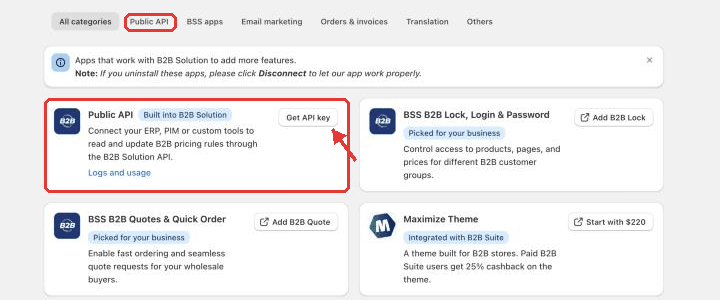
1. In the Shopify admin, open the app and click **Integrations** in the sidebar, then open the **Public API** tab.
2. Click **Get API key**. The **API key** page opens.
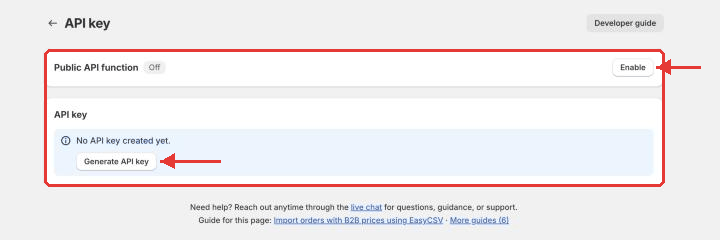
3. In the **Public API function** card, click **Enable** if the badge shows **Off**. While the function is off, API calls are rejected.
4. Under **API key**, click **Generate API key**.
Public API tab in Integrations
API key page
5. **Copy** or **Download** your key from the success banner ("Your API key is generated").
{% hint style="warning" %}
Please store or download the API key at that moment, as it will not be shown again ("Make sure you save it - you won't be able to access it again").
{% endhint %}
To replace a key, delete the old one first (**Delete access key**), then generate a new one. Changing or cancelling your plan deletes the key, so generate a new one after a plan change.
6. Include it in every request — either in the request body as `accessKey`, or as a header. **The header name depends on the API version**, so check which one your endpoint uses:
| API version | Endpoints | Header name |
| ---------------------- | ------------------------------------------------------------------------------------------------------------------- | ------------------- |
| **v1** (`/api/v1/...`) | Uploading, Custom Pricing (CP), Price List (PL), Registration Form (RF), and all `v1` Volume Pricing (VP) endpoints | `x-bss-b2b-api-key` |
| **v2** (`/api/v2/...`) | Volume Pricing (VP) `GET /api/v2/vp/rules` | `x-api-key` |
{% hint style="warning" %}
Do **not** send the key as `Authorization: Bearer ` — this format is not supported and will fail with `401 accessKey is required`.
{% endhint %}
### Send the right domain
Every request also carries your store's `domain`. Send the **myshopify.com** domain of your store, for example `your-store.myshopify.com`, **without** `https://` and **without** a trailing slash. Your custom domain (for example `www.yourbrand.com`) and any other form are rejected:
| API version | Response |
| ----------- | --------------------------------------------------------------------------------------------------------------------------------------------------------------------------------------- |
| **v1** | Status `200` with `success: false` and the message *Invalid domain. Send your store's myshopify.com domain without https\:// or a trailing slash, for example your-store.myshopify.com* |
| **v2** | Status `400` with code `DOMAIN_INVALID` and the same message |
## Available API Groups
{% content-ref url="/pages/Eh2qerzZCeHDwqrXdVkG" %}
[🔗Public APIs for Uploading](/b2b-wholesale-solution/api-integration/public-apis/public-apis-for-uploading.md)
{% endcontent-ref %}
{% content-ref url="/pages/UdBciowEvZI13eW63r7d" %}
[🔗Public APIs for Volume Pricing (VP)](/b2b-wholesale-solution/api-integration/public-apis/public-apis-for-volume-pricing-vp.md)
{% endcontent-ref %}
{% content-ref url="/pages/YrnO0EcwY7KxFHOpPYCy" %}
[🔗Public APIs for Custom Pricing (CP)](/b2b-wholesale-solution/api-integration/public-apis/public-apis-for-custom-pricing-cp.md)
{% endcontent-ref %}
{% content-ref url="/pages/Io5bYMqHwBMOFZena7bc" %}
[🔗Public APIs for Price List (PL)](/b2b-wholesale-solution/api-integration/public-apis/public-apis-for-price-list-pl.md)
{% endcontent-ref %}
{% content-ref url="/pages/rd4YseJBr4UDabDTgF5v" %}
[🔗Public APIs for Registration form (RF)](/b2b-wholesale-solution/api-integration/public-apis/public-apis-for-registration-form-rf.md)
{% endcontent-ref %}
| API Group | What it manages |
| --------------------------- | ---------------------------------------------- |
| Uploading APIs | Upload/sync active rules to your Shopify theme |
| Volume Pricing (QB) APIs | Manage quantity break / volume pricing rules |
| Custom Pricing (CP) APIs | Manage custom pricing rules |
| Price List (PL) APIs | Manage price list per customer rules |
| Registration Form (RF) APIs | Manage wholesale registration workflows |
## Request history and in-app guide
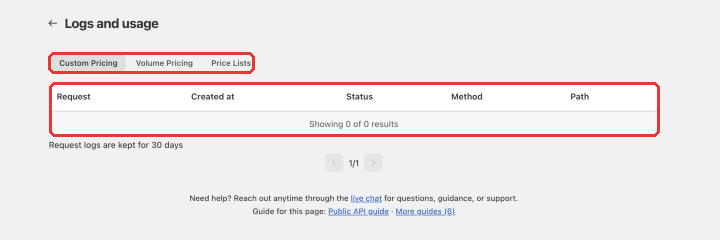
* **Request history:** go to **Integrations › Public API › Logs and usage** (**View logs**) to see your API requests: request, method, path, status, status code and created time. Click a request to see the request body and the response code, message and time. Calls to Custom Pricing, Volume Pricing and Price Lists are logged, and logs are kept for 30 days.
* **In-app guide:** click **Read guide** on the **Public API** tab (or the **Developer guide** button on the API key page) to open the **Public API guide** with endpoints, examples, errors and limits for your developer.
Public API request history
## Rate Limits
| Endpoint group | Limit |
| ---------------- | ---------------------------------- |
| Upload endpoints | 1 request per module per 5 minutes |
Exceeding rate limits returns a **429 Too Many Requests** response.
## Technical Constraints
Pricing data is stored in Shopify metafields as JSON with these limits:
* Maximum **10 keys** per metafield
* Maximum **2,000,000 characters per key**
* Maximum **\~20,000,000 characters total**
Content exceeding these limits will not be uploaded to the theme.
{% hint style="info" %}
If you need further assistance, please feel free to reach us at [**support@bss-b2b.solutions**](mailto:support@bss-b2b.solutions) or [**Live Chat**](https://go.crisp.chat/chat/embed/?website_id=9f64b5a9-1a02-4190-93b8-8ef56b19f740).
{% endhint %}