> For the complete documentation index, see [llms.txt](https://docs-shpf.bsscommerce.com/b2b-wholesale-solution/llms.txt). Markdown versions of documentation pages are available by appending `.md` to page URLs; this page is available as [Markdown](https://docs-shpf.bsscommerce.com/b2b-wholesale-solution/b2b-pricing/more-add-depth-and-flexibility-to-your-b2b-pricing/shipping-rate/set-up-your-wholesale-shipping-rate.md).
# Set Up Your Wholesale Shipping Rate
Create custom shipping fee rules for B2B customers based on order quantity, amount, or weight.
A Shipping Rate rule sets the shipping price at checkout for matching customers, based on the cart **quantity**, **amount** or **weight**. The rule **Name** is the shipping line customers see at checkout.
## Open Shipping Rate and add a rule
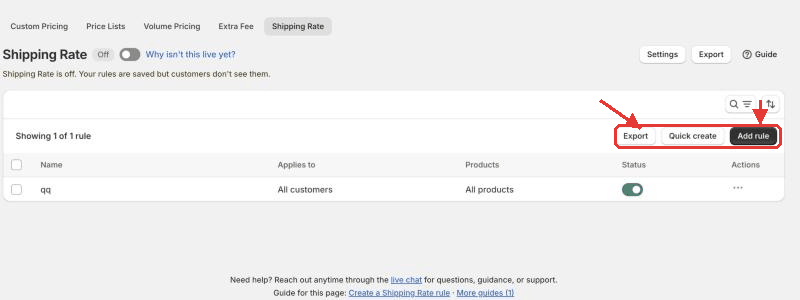
1. In the Shopify admin, open the B2B Solution app and go to **B2B pricing › Shipping Rate**.
2. Make sure the switch next to the **Shipping Rate** title is **On**.
3. Click **Add rule** above the rule list. If you have no rules yet, click **Add shipping rate** instead.
Open Shipping Rate and add a rule
{% hint style="success" %}
**Need many simple rules quickly?** Click **Quick create**. One row becomes one rule: pick the customers (**Customers with tag**, **Specific customers**, **All customers** or **Logged-in customers**), the **Rate type** (**Flat rate** or **Percentage of cart total**) and the **Value**. The rule name is written for you. Quick create rules apply to all products and all markets from the first item, so open a rule afterwards to add tiers or limits.
{% endhint %}
The rule page (**New shipping rate rule**) is one page with the sections below, plus a **Make Shipping Rate live** card (see [Save and make it live](#save-and-make-it-live)).
***
## Rule
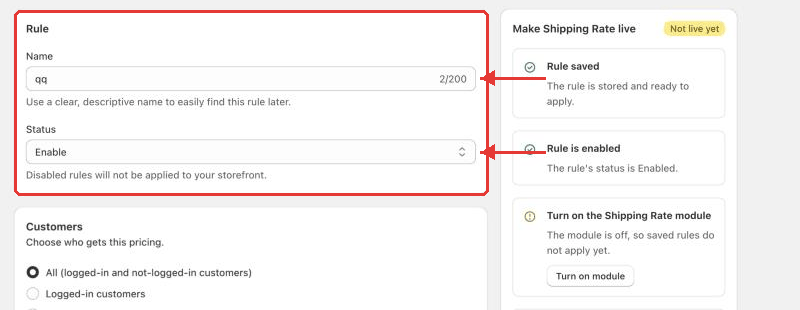
Name the rule
| Field | Options | What it does |
| ---------- | ------------------------ | ----------------------------------------------------------------------------------------------------------------------------------------------------------------------------------------------------------------------------------------------------------------------------------- |
| **Name** | Text | This is the shipping line customers see at checkout, for example "Wholesale shipping". If you leave it empty, it is written for you from the customers, for example "Shipping rate for tag wholesale". Give each rule its own name — a name another rule already uses is not saved. |
| **Status** | **Enable** / **Disable** | Only enabled rules apply on the storefront. The rule list shows a status badge per rule (**Active**, **Scheduled**, **Expired**). |
***
## Customers
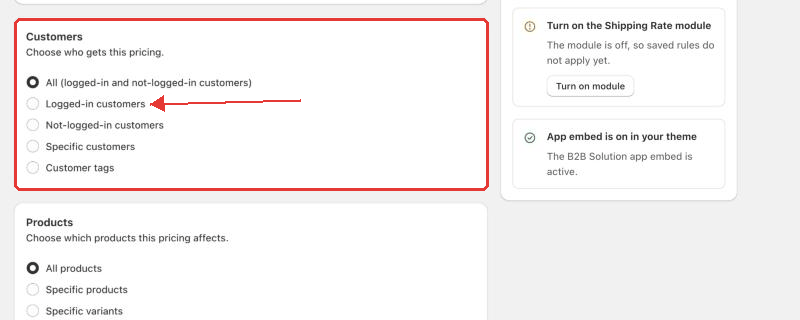
Choose who gets this rate
| Field | Options | What it does |
| ------------- | ------------------------------------------------------------------------------------------------------------------------------------------------ | ----------------------------------------------------------------------------------------------------------- |
| **Customers** | **All** (logged-in and not-logged-in customers), **Logged-in customers**, **Not-logged-in customers**, **Specific customers**, **Customer tags** | Choose who gets this shipping rate. Use **Customer tags** (for example `wholesale`) to cover a whole group. |
***
## Products
| Field | Options | What it does |
| ------------ | ------------------------------------------------------------------------------------------------- | -------------------------------------- |
| **Products** | **All products**, **Specific products**, **Specific variants**, **Collections**, **Product tags** | Choose which products the rule covers. |
***
## Markets
| Field | Options | What it does |
| ----------- | ------------------------------------- | ------------------------------------------------------------------------------------------------------------------------------------------------------------------------------------------------------------------------------------------------------------------------------------------------------------------------------ |
| **Markets** | **All markets**, **Specific markets** | Limit the rule to the [Shopify Markets](https://help.shopify.com/en/manual/markets) you manage in Shopify admin › **Settings › Markets**. Keep **All markets** to apply the rule everywhere. Use **Specific markets** for different rates per region, for example a flat rate for domestic and a higher one for international. |
***
## Rule settings
Set the rate ranges
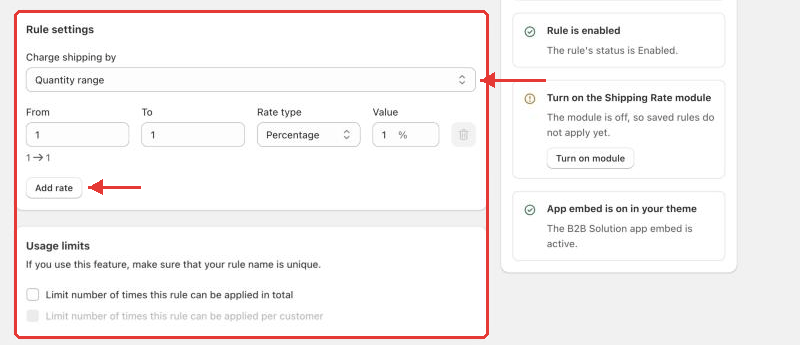
Choose **Charge shipping by**:
| Option | What it measures |
| ------------------ | -------------------------------------------- |
| **Quantity range** | Number of items in the cart |
| **Amount range** | Total cart amount in your store currency |
| **Weight range** | Total cart weight (also choose the **Unit**) |
For each range, fill in:
| Field | Options | What it does |
| ----------------- | ----------------------------- | ------------------------------------------------------------------------------------------------------------------------------------------------ |
| **From** / **To** | Numbers | The range the rate covers. Leave **To** empty for no upper limit. On the last range this makes sure every cart gets a rate. |
| **Rate type** | **Percentage**, **Flat rate** | **Percentage** is a percentage of the cart amount. **Flat rate** is a fixed shipping fee. For a free-shipping range, use a **Flat rate** of `0`. |
| **Value** | Number | The percentage or flat amount. Required. |
Click **Add rate** to add the next range and build a tiered structure.
## Usage limits (optional)
Under **Usage limits**, tick either or both:
* **Limit number of times this rule can be applied in total** — caps total use across all customers.
* **Limit number of times this rule can be applied per customer** — each customer can benefit only a set number of times.
{% hint style="warning" %}
The per-customer limit works when **Customers** is **Logged-in customers**, **Specific customers** or **Customer tags**. It is not available for **All** or **Not-logged-in customers**.
{% endhint %}
***
## Exclusions and schedule (optional)
This section is collapsed by default — click it to open. It opens automatically when the rule already has exclusions.
| Field | Options | What it does |
| --------------------- | ------------------------------------------------------------------ | -------------------------------------------------------------------------------------------------------------------------- |
| **Exclude customers** | **None**, **Specific customers**, **Customer tags** | These customers never get this rate, even if they match **Customers**. For example, exclude the tag `staff`. |
| **Exclude products** | **None**, **Specific products**, **Collections**, **Product tags** | These products don't trigger the rule, even when other products in the cart do. Variants can't be excluded. |
| **Schedule** | Start date and time; optional end date and time | Run the rule only inside a time window. The list badge shows **Scheduled** before the start and **Expired** after the end. |
***
## Save and make it live
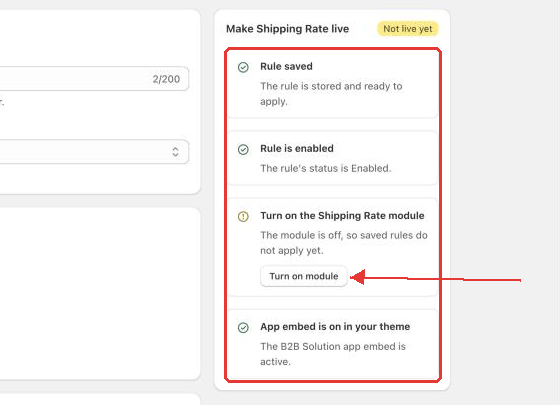
1. Click **Save** in the save bar. The rule is created and the page reopens with the **Make Shipping Rate live** card at the top. (When you reopen a saved rule later, the same card sits in the right sidebar and shows a **Live** or **Not live yet** badge.)
2. Check every row of the card until it shows **Live**:
* **Rule saved**
* **Rule is enabled** — shows **Rule is disabled** if the status is off. A scheduled rule waits for its start date; an expired rule needs new dates.
* **Shipping Rate module is on** — click **Turn on module** if it is off.
* **App embed is on in your theme** — click **Open theme editor**, turn on the B2B Solution app embed, save, then click **Check again**.
Make Shipping Rate live checklist
3. Test it: log in to your storefront as a matching customer, add products the rule covers and go to checkout. The rate shows as the shipping line with your rule name.
***
## Manage rules
* **Edit** — click the rule name in the list.
* **Quick edit** — use the row action **Quick edit** (or select several rules and choose **Edit status**) to change a rule's name, status or **Applies to** (**Customers with tag**, **Specific customers**, **All customers** or **Logged-in customers**) without opening it.
* **Duplicate** — to reuse a setup across markets, customer groups or product lines, open a saved rule and click **Duplicate**, then confirm. The copy keeps customers, products, variants, markets, usage limits and rates, and opens in a new tab. Give it a unique name, adjust it and click **Save**.
* **Delete** — from the rule list.
* **Search** — use the search box above the list.
### Export your rules
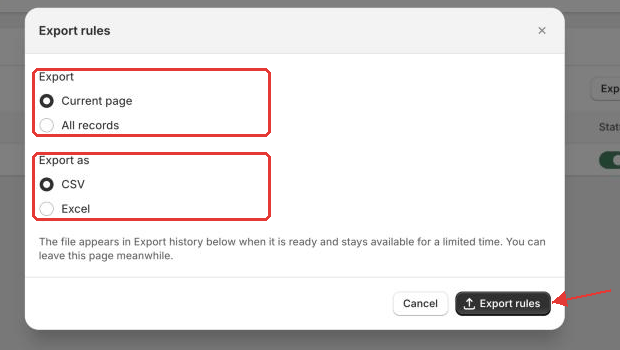
1. Go to **B2B pricing › Shipping Rate**. Click **Export** above the rules list, or select rules and choose **Export** from the bulk actions. (**Export** in the page header also works.)
2. In the **Export rules** window, choose what to export: **Current page**, **All records**, **Selected records** (when you have ticked rules) or the records matching your search (when a search is active).
3. Under **Export as**, choose **CSV** or **Excel**, then click **Export rules**.
4. The export runs in the background with a progress message. When it finishes, click the download link.
Export rules window opened from the rules list
{% hint style="info" %}
Download links expire after 24 hours — run the export again to get a new link. Shipping Rate rules can be exported but not imported.
{% endhint %}
***
## Choose which rate applies
When several rules match, go to **Shipping Rate › Settings** to decide which rate wins and what it is based on. See [Settings for Shipping Rate](/b2b-wholesale-solution/b2b-pricing/more-add-depth-and-flexibility-to-your-b2b-pricing/shipping-rate/settings-for-shipping-rate.md).
## What customers see
On the checkout, the configured wholesale shipping rate appears automatically when the customer and cart match the rule.
{% hint style="warning" %}
When a rule matches the cart, the app sets that rule's rate (with its name and price) as the **only shipping line** of the checkout it creates. Your Shopify shipping rates, free shipping and local pickup are not offered next to it. If some buyers must be able to pick up or choose other rates, limit the rule to the customers who should get it.
The rate is added when a matching customer uses your cart's checkout button or **Buy it now** — it is not shown inside the cart. A discount code that gives free shipping, or an Extra Fee range with **Free shipping**, takes priority over Shipping Rate.
{% endhint %}
### Troubleshooting: the rate doesn't show at checkout
Check that:
* Shipping Rate and the app embed are **On**.
* The rule is **Enabled** and not scheduled or expired.
* Its usage limit is not used up.
* The customer and market match the rule.
* The cart falls in one of your ranges (counted on **Entire order** or **Applied products only**, as set in Settings).
Still stuck? Chat with us — the team can check your theme for free.
{% hint style="info" %}
If you need further assistance, please feel free to reach us at [**support@bss-b2b.solutions**](mailto:support@bss-b2b.solutions) or [**Live Chat**](https://go.crisp.chat/chat/embed/?website_id=9f64b5a9-1a02-4190-93b8-8ef56b19f740).
{% endhint %}