# 📦 Set Tiered Pricing by Purchase Volume

Want to reward your bulk buyers and boost average order value? With our **Volume Pricing** feature, you can easily configure **tiered discounts** that automatically adjust pricing as customers add more to their cart — based on either **quantity purchased** or **total spend**.

## 🛠️ How to Configure Volume Pricing

### 1. **Enable & Navigate to Configuration**

<figure><img src="https://1478990334-files.gitbook.io/~/files/v0/b/gitbook-x-prod.appspot.com/o/spaces%2FGolQYRPH9iUGYatlTXwl%2Fuploads%2F8vF8r8QOQBZgsORVakNu%2Fimage.png?alt=media&#x26;token=74b083d9-bf3a-4627-87c8-ca556f52c848" alt=""><figcaption></figcaption></figure>

Turn on the **Volume Pricing** module under **B2B Pricing**, then click “Configuration” to begin building your discount rules.

### 2. General Information

<figure><img src="https://1478990334-files.gitbook.io/~/files/v0/b/gitbook-x-prod.appspot.com/o/spaces%2FGolQYRPH9iUGYatlTXwl%2Fuploads%2FXqj39QcEoXCPIu8hBCzr%2Fimage.png?alt=media&#x26;token=eae0fc48-fea1-4417-afed-50c663e481d2" alt=""><figcaption></figcaption></figure>

* **Name your rule** for easy reference
* Set **priority** (lower number = higher priority)
* Enable or disable the rule as needed

> If two rules conflict and have the same priority, the one created earlier takes precedence.

### 3. Assign to Customers

<figure><img src="https://1478990334-files.gitbook.io/~/files/v0/b/gitbook-x-prod.appspot.com/o/spaces%2FGolQYRPH9iUGYatlTXwl%2Fuploads%2FKYuyjR2tnZhEfay6HXF3%2Fimage.png?alt=media&#x26;token=ab8bfdeb-bd91-4fbe-ba02-18bb8f42bce9" alt=""><figcaption></figcaption></figure>

Choose which customers will see and benefit from your tiered pricing:

* Pick individual emails
* Use tags to group eligible customers (e.g. “wholesale”)

### 4. **Exclude Specific Customers (Optional)**

<figure><img src="https://1478990334-files.gitbook.io/~/files/v0/b/gitbook-x-prod.appspot.com/o/spaces%2FGolQYRPH9iUGYatlTXwl%2Fuploads%2FK7QbA7sjZTQLAHLnu8ki%2Fimage.png?alt=media&#x26;token=1e9ca329-a2e8-43c4-8968-a5b5fcfc0b1c" alt=""><figcaption></figcaption></figure>

If certain customers should *not* benefit from this rule, exclude them here.

### 5. **Apply to Products**

<figure><img src="https://1478990334-files.gitbook.io/~/files/v0/b/gitbook-x-prod.appspot.com/o/spaces%2FGolQYRPH9iUGYatlTXwl%2Fuploads%2Fvf5QtXS6SxOn3fiCOGdD%2Fimage.png?alt=media&#x26;token=068963d8-a54c-4658-b43d-1e3358454e9b" alt="" width="563"><figcaption></figcaption></figure>

Select which products or collections should be covered by your tiered pricing rules.

### 6. **Exclude Products (Optional)**

<figure><img src="https://1478990334-files.gitbook.io/~/files/v0/b/gitbook-x-prod.appspot.com/o/spaces%2FGolQYRPH9iUGYatlTXwl%2Fuploads%2Fb6TQb1ePm5paIlSwwJHY%2Fimage.png?alt=media&#x26;token=4f1d873c-3b62-439a-992d-d630adec5cfa" alt=""><figcaption></figcaption></figure>

Exclude items you don’t want to apply discounts to (e.g. limited-edition products, services).

{% hint style="info" %}
Products/collections should be published to the Online Store to be able to apply the rule
{% endhint %}

### 7. Volume Pricing Type

<figure><img src="https://1478990334-files.gitbook.io/~/files/v0/b/gitbook-x-prod.appspot.com/o/spaces%2FGolQYRPH9iUGYatlTXwl%2Fuploads%2F540GI6tSEkGFVWjqVd4l%2Fimage.png?alt=media&#x26;token=a57ce0b3-1f7e-4b81-9b90-31df8d9e1500" alt=""><figcaption></figcaption></figure>

Decide between **Quantity-based Pricing** or **Value-based Pricing**:

* *Quantity-based Pricing* applies discounts based on how many items are in the cart
* *Value-based Pricing* applies discounts based on the combined dollar value of items

You’ll also choose the **scope**:

* *Order-level* — entire order qualifies
* *Product-level* — discount applies per product
* *Variant-level* — discount per specific variant (e.g., size/color)

This could be confusing, so the further explanation will be in the **Example of a Quantity/Value-based Pricing rule in conjunction with the Apply to setting**

### **8. Define the Tiers**

<figure><img src="https://1478990334-files.gitbook.io/~/files/v0/b/gitbook-x-prod.appspot.com/o/spaces%2FGolQYRPH9iUGYatlTXwl%2Fuploads%2F90N7LcIoQ0yddPQnPmji%2Fimage.png?alt=media&#x26;token=a3c59196-49f9-4ec1-ae2b-5ef6a8ec40e0" alt=""><figcaption></figcaption></figure>

Set your discount structure:

* **Fixed Price** — items meeting the threshold are sold at that fixed price

For example, you have 2 products priced at $10 and $12 to be chosen at Step 5. If you choose Fixed price and the Discount value is $8, both products will be $8 when the quantity/amount meets the criteria.

* **Fixed-amount Decrease** — subtract a fixed dollar amount

For example: Discount value is $2, then your products will be discounted from $10 to $8.

* **Percentage Decrease** — reduce price by a percentage

For example: Discount value is 20%, then your products will be discounted from $5 to $4.

You’re free to add multiple tiers. Once your setup is complete, click **Save**.

In Table style, you can choose among 9 table styles, which you can customize in [Design Table](https://b2b-solution.bsscommerce.com/qb/design-table/quantity-break)

* You can also preview how the table looks on the right-side corner

### 9. **Install / Apply Rule**

Choose an installation method (auto or manual), then activate your pricing logic.

<figure><img src="https://1478990334-files.gitbook.io/~/files/v0/b/gitbook-x-prod.appspot.com/o/spaces%2FGolQYRPH9iUGYatlTXwl%2Fuploads%2FEaXUnH0Wjnh3tExvGR8L%2Fimage.png?alt=media&#x26;token=c0d21d8a-e403-44a0-9cdd-678bffba0f87" alt=""><figcaption></figcaption></figure>

Choose one of these two options:

<figure><img src="https://1478990334-files.gitbook.io/~/files/v0/b/gitbook-x-prod.appspot.com/o/spaces%2FGolQYRPH9iUGYatlTXwl%2Fuploads%2Fp3WhTMNaNW3HFqkjdLS8%2Fimage.png?alt=media&#x26;token=15afacb7-01ba-4055-8004-7a798b34d078" alt=""><figcaption></figcaption></figure>

{% hint style="info" %}
If the prices don't change to what you expect, please don't hesitate to contact us at <support-sbc@bsscommerce.com> or use our [Live Chat](https://go.crisp.chat/chat/embed/?website_id=9f64b5a9-1a02-4190-93b8-8ef56b19f740) for assistance.
{% endhint %}

## 🔍 Real-World Example

Imagine you have two products — A and B — and you create discount tiers:

* **5 to 20 units** → “10% off”
* **21 to 50 units** → “20% off”

If someone orders **45 units total**:

* **Order-level** rule → Entire order gets 20% off
* **Product-level** → Product A (35 units) gets 20%, Product B (10 units) gets 10%
* **Variant-level** → Discounts applied per variant (e.g. size/color), based on individual variant quantities

***

#### 🛒 What Customers See on Storefront

* When shoppers meet a tier, the discounted price replaces the original automatically
* Quantities may “jump” to threshold numbers when clicked (e.g. clicking a tier label adjusts quantity accordingly)
* At checkout, the final tiered discount is applied
* When combined with **Custom Pricing / Price List**, the app prioritizes the Custom Pricing / Price List rules first

<figure><img src="https://lh6.googleusercontent.com/3kC0EA3BELGPzozFSAPqANYxsIG_9WQmqDh84YR85bwt-4mnpUYZhWcL_GKHM0rc4vo26s5hVn1WR3VxBokogOCjwZTsjEPrI6r9l7fTt4aOgftK4_GM9v4N3SL7y0ELgvCj96he43q7c9IzMlycit4" alt=""><figcaption></figcaption></figure>

You can also click on the quantity range, and the quantity automatically jumps to the number:

<figure><img src="https://lh5.googleusercontent.com/mYfr0ikIywdBz-vw16qnq5n6JTiwf7vbRVTbvEY8ScD5QYiBCJYFttnERZJghVnwfeHUqw8ktisRWf8ESFDWtwyxGc5JIv4vaOT7QvDGcYJw0BkHJYshvqtFBctqPJo4NbGYKPZSJAh-kMsJbtAmFek" alt=""><figcaption></figcaption></figure>

{% hint style="info" %}
If you want the quantity to jump to the maximum number of the row, head to [Settings](https://b2b-solution.bsscommerce.com/qb/settings) (in the example, it's 100 instead of 20)
{% endhint %}

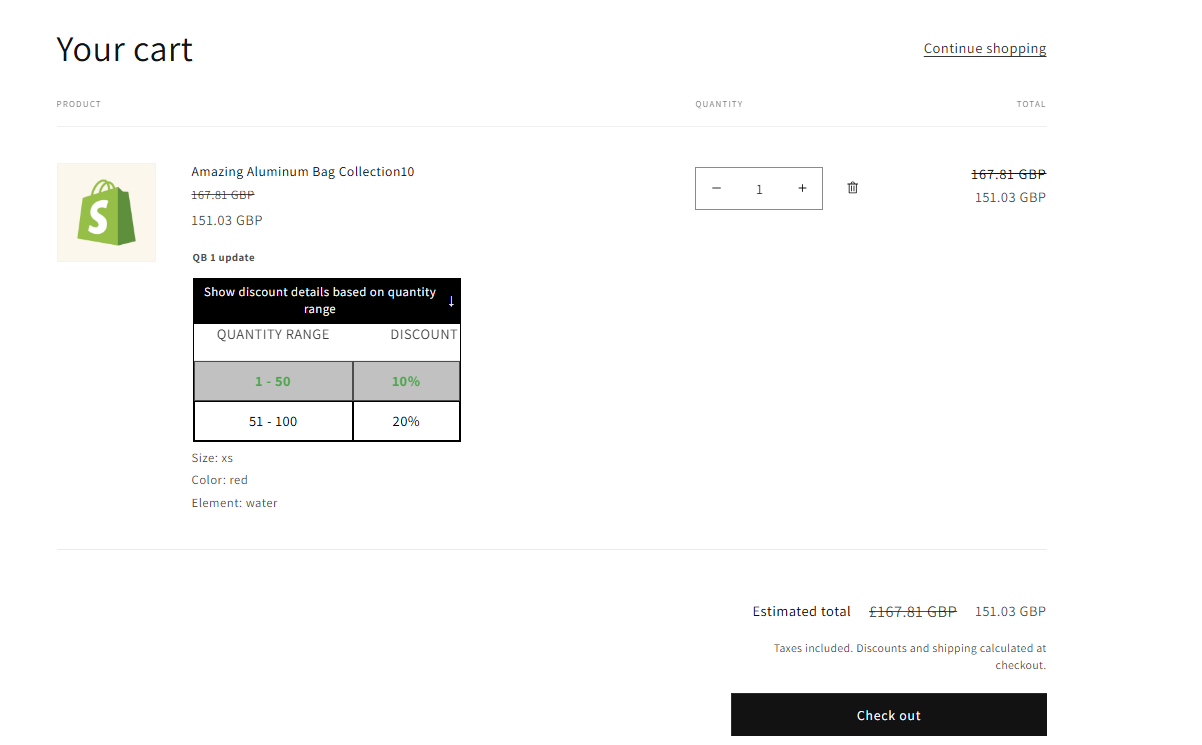
Here's the result on the Cart page:

<figure><img src="https://1478990334-files.gitbook.io/~/files/v0/b/gitbook-x-prod.appspot.com/o/spaces%2FGolQYRPH9iUGYatlTXwl%2Fuploads%2FPXrTUZmIb2rXefmpL7zP%2Fimage.png?alt=media&#x26;token=98c771f3-eb3a-469b-8767-60531d768e89" alt=""><figcaption></figcaption></figure>

{% hint style="info" %}
If you use Volume Pricing in conjunction with Custom Pricing or Price List, the app will apply the prices from the Custom Pricing/Price List rule first.
{% endhint %}

Need help or have questions? Feel free to contact us at ***<support-sbc@bsscommerce.com>*** \
or use Live Chat directly.