# Control Access (Access & Message)

In **Step 2 - Control access**, you define **who can unlock or see the content** you targeted.

B2B Lock uses **rules** (conditions) that describe *which visitors are allowed* and *which are blocked*. You can use a single condition for simple cases, or combine multiple conditions with **AND / OR logic** for more advanced B2B scenarios.

Below are the main condition types supported.

***

#### 1. Signed-in customers

**What it is**\
This rule requires visitors to be **logged in with a Shopify customer account** before they can access the locked content.&#x20;

* If **true** (customer is signed in) → they’re allowed.
* If you invert it (e.g., *If the customer is not signed in*) → only guests are affected.

**Typical uses**

* Hide prices from **guest users**; show prices only to logged-in customers.
* Lock pages or entire site behind a **login screen**.
* Ensure only known customers (with accounts) can view certain content.

***

#### 2. Customer tags

**What it is**\
This rule checks whether a customer has **specific tags** on their Shopify customer record.

* If **tagged with** one of the selected tags → grant access.
* When inverted (*If the customer is not tagged with…*) → block those tags or allow everyone else.

**Typical uses**

* Wholesale-only products/collections (tag: `wholesale`, `b2b-approved`).
* Segment-based catalogs (e.g., `silver` vs `gold` customers see different product sets).
* Regional or channel tags (e.g., `EU-distributor`, `JP-partner`).

**Examples**

* “If the customer is tagged with `wholesale`” → show wholesale catalog.
* “If the customer is tagged with `silver`” → show only products tagged `silver`.

This is one of the most powerful conditions for B2B because it works perfectly with **B2B & Wholesale Solution** registration/approval flows.

***

#### 3. Passcode

**What it is**\
This rule requires visitors to **enter a passcode** (password) to access the locked content. The passcode must match the one you configure in the rule.

* If they enter the correct passcode → grant access.
* If not → show the passcode prompt again.

You can also configure whether the passcode is **case-sensitive** and adjust how long it stays valid (via advanced settings).

**Typical uses**

* Private landing pages for specific partners or campaigns.
* Temporary locked content shared only with certain groups.
* Simple “invite-only” areas without needing accounts or tags.

***

#### 4. Secret link

**What it is**\
This rule only allows access if the visitor arrives via a **special URL** that includes a secret token.

* The rule generates (or expects) a URL like:\
  `/collections/wholesale?token=123@`
* If the visitor uses this URL → grant access.
* If they come via any other link → deny access.

**Typical uses**

* Hidden collections or pages for **VIP or early access** campaigns.
* Secret sales where only people with the link can see products/prices.
* “Soft-gated” content you don’t want to show in navigation or search.

***

#### 5. Other conditions supported

Beyond login, tags, passcode, and secret link, B2B Lock supports several additional conditions for more complex scenarios:

* **Everyone – No restrictions**
  * Rule applies to everyone who has access to the content.
  * Often used as a fallback or for “public” behavior in combination with other locks.
* **Email subscribers – Must be subscribed**
  * Requires the visitor to subscribe with their email before accessing content.
* **Age verified – Must confirm age**
  * Ideal for **18+ content** (alcohol, adult products, etc.).
  * After confirming age, the visitor is allowed to access.
* **Specific customers – Must match exact email**
  * Only selected customer accounts (by email) can view the content.
  * Non-selected customers and visitors are blocked.
* **Geo / environment conditions** (depending on version/plan)
  * Conditions like **IP address, location, or Shopify market** to give access only to certain regions.&#x20;
* **Custom Liquid** (advanced)
  * For very specific logic, developers can evaluate custom Liquid conditions to decide access.&#x20;

These allow you to build highly tailored rules, like **“age-verified EU customers only”** or **“newsletter subscribers from US market”**.

***

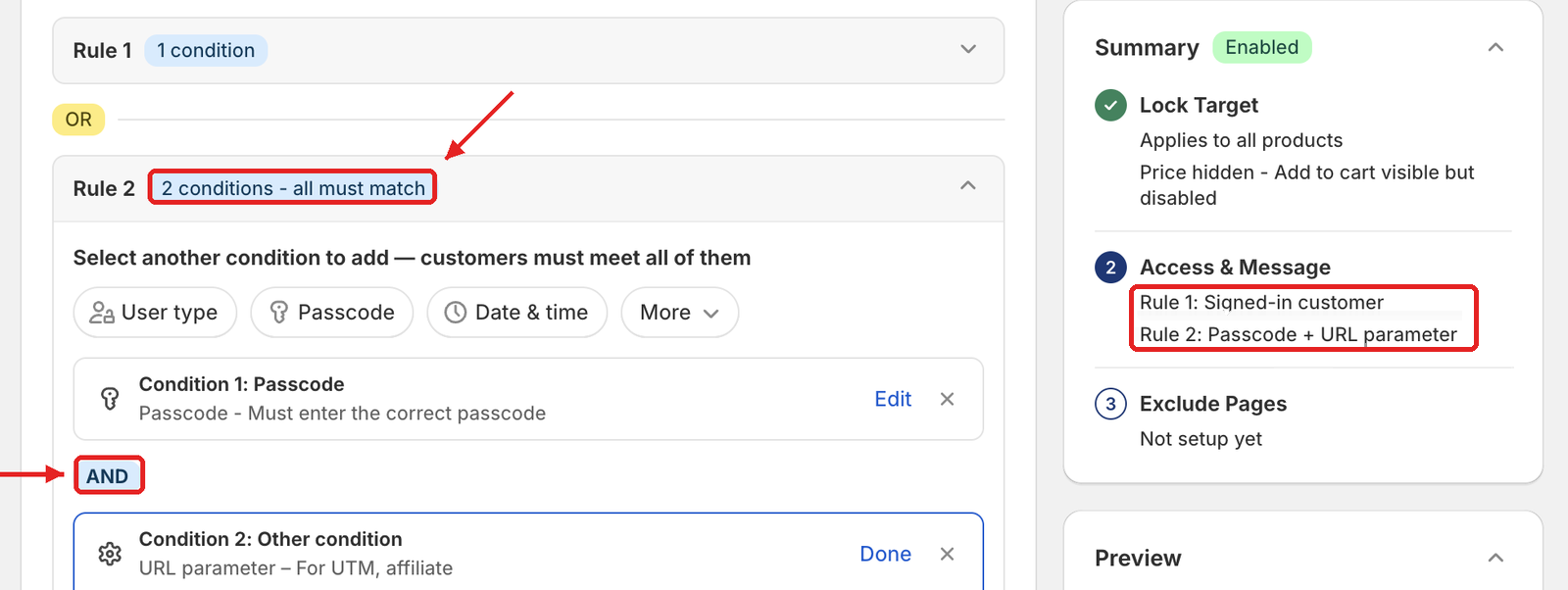
#### 6. AND/OR logic & multiple rules per lock

B2B Lock’s new version lets you combine **multiple conditions** inside a single lock using **AND / OR** logic.&#x20;

**Examples**

* **AND logic** (all must be true):
  * *If the customer is signed in* **AND** *If the customer is tagged with `wholesale`*
    * Only logged-in wholesale customers can see the content.
* **OR logic** (any can be true):
  * *If the customer is tagged with `distributor`* **OR** *If they arrive via the secret link*
    * Either distributors or people with the secret URL are allowed.

You can also define **multiple rules within one lock** to support layered behavior, for example:

* Rule 1: If customer is tagged `VIP` → allow access.
* Rule 2: If customer arrives via secret link → allow access.
* Fallback: Everyone else → see lock message.

This is a big improvement over the old version, where you could typically use **only one condition type per lock**. Now, the same lock can fully express your real B2B logic without needing a lot of duplicated rules.&#x20;

***

#### Recap

In **Control access**, you answer:

> **“Which visitors are allowed to see this locked content?”**

You can choose from:

* **Signed-in customers** (login-based access)
* **Customer tags** (segments like wholesale, VIP, silver/gold)
* **Passcode** (password-protected content)
* **Secret link** (special URL access)
* **Email subscribers, age checks, specific emails, geo/IP, and more**

…and then combine them with **AND / OR logic** for flexible, real-world B2B rules.


---

# Agent Instructions: Querying This Documentation

If you need additional information that is not directly available in this page, you can query the documentation dynamically by asking a question.

Perform an HTTP GET request on the current page URL with the `ask` query parameter:

```
GET https://docs-shpf.bsscommerce.com/bss-b2b-lock-login-password-hide-price/lock-core-concepts/control-access-access-and-message.md?ask=<question>
```

The question should be specific, self-contained, and written in natural language.
The response will contain a direct answer to the question and relevant excerpts and sources from the documentation.

Use this mechanism when the answer is not explicitly present in the current page, you need clarification or additional context, or you want to retrieve related documentation sections.