> For the complete documentation index, see [llms.txt](https://docs-shpf.bsscommerce.com/b2b-wholesale-solution/llms.txt). Markdown versions of documentation pages are available by appending `.md` to page URLs; this page is available as [Markdown](https://docs-shpf.bsscommerce.com/b2b-wholesale-solution/b2b-pricing/price-list-per-customer/import-and-export-price-list-rules.md).
# Import & Export Price List Rules
When managing large catalogs or tailoring numerous pricing schemes for different B2B customer tiers, manually creating each price list in the admin can be time-consuming. The **Import & Export Price List** feature allows you to **bulk upload, update, or migrate** Price List rules using a CSV file.
***
## 📤 Export Existing Rules
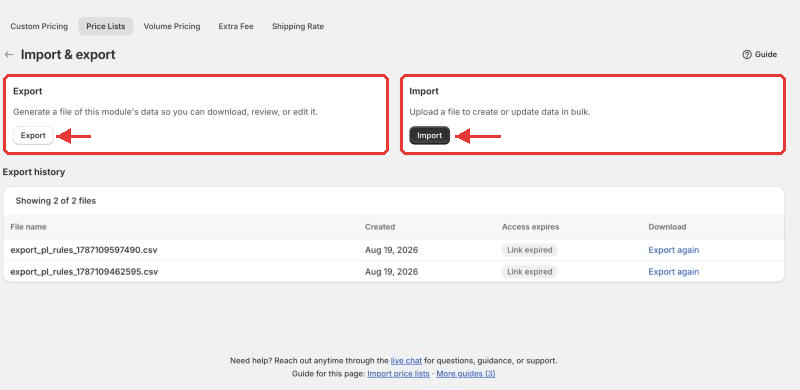
1. Go to **B2B pricing › Price Lists**, click **More actions** and choose **Import & export**.
2. On the **Import/Export** page click **Export** (the **Export** card).
3. Choose a **file format**: **CSV** or **Excel**. All price lists are exported, with each extra product on its own row.
4. The export runs as a **background job** with a progress indicator; you can keep working.
5. When it finishes, click the download link. Choose **CSV** if you want to import the file again.
Import/Export page
{% hint style="info" %}
**Export history** sits below the two cards on the same page. Files are kept for **1 day**: use **Download** to get a recent file again, or **Export again** if the link shows **Link expired**.
{% endhint %}
### Export from the rules list
You can also export without leaving the rules list:
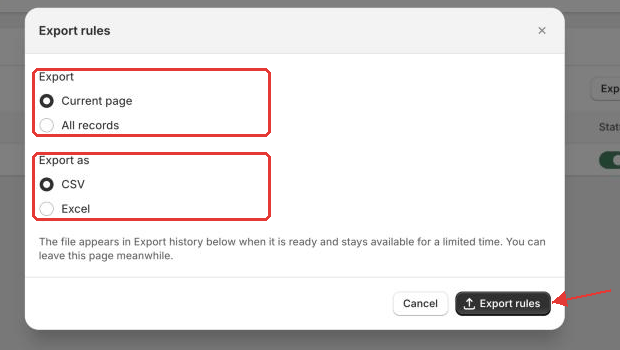
1. Go to **B2B pricing › Price Lists**. Click **Export** above the rules list, or select rules and choose **Export** from the bulk actions.
2. In the **Export rules** window, choose what to export: **Current page**, **All records**, **Selected records** (when you have ticked rules) or the records matching your search (when a search is active).
3. Under **Export as**, choose **CSV** or **Excel**, then click **Export rules**.
4. The export runs in the background, so you can leave the page. When it finishes, click the download link.
Export rules window opened from the rules list
{% hint style="info" %}
**Tip:** Always export your current rules before making large updates. The exported file is both a backup and a template for editing.
{% endhint %}
***
## 📥 Import New or Updated Rules
### Step 1: Download the Sample Template
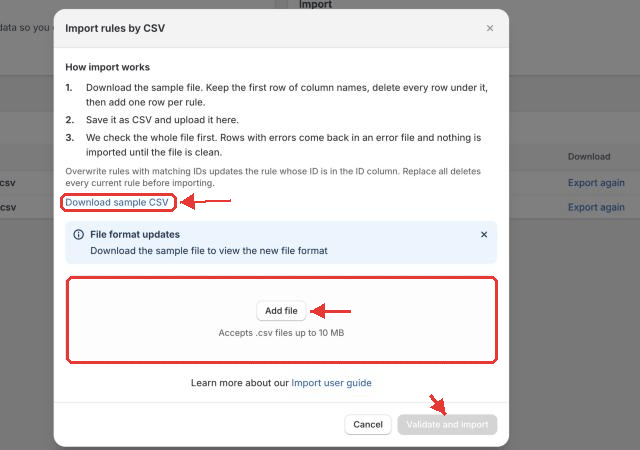
1. Go to **B2B pricing › Price Lists › More actions › Import & export**.
2. Click **Import**.
3. Click **Download sample CSV**.
{% hint style="warning" %}
Delete every row under the column names before you upload, including the **Required/Optional**, **Data type** and **Example** rows and the example rules. The importer reads them as real rules.
{% endhint %}
***
### Step 2: Fill in the CSV Template
| Scenario | What to fill in CSV |
| --------------------------------- | ----------------------------------------------------------------------------------------------------------------------------------------------------------------------------------------------------------------------------------------------------------------------------- |
| **Create a new rule** | Leave the **ID** column blank. |
| **Update an existing rule** | Put the rule's **ID** (from an export) on the rule's first row only. |
| **Multiple products in one rule** | Put the rule settings and the first **Product**, **Discount type** and **Discount value** on one row. For each extra product add a row with only **Product**, **Discount type** and **Discount value** filled. Leave every other column blank, including **ID** and **Name**. |
{% hint style="warning" %}
A row that repeats the ID or the name becomes a **separate rule**. List each product or variant only once per rule.
{% endhint %}
***
## 💡 Choosing the Right Discount Type
Merchants often ask which **Discount type** value to enter in the CSV. Below is a quick decision guide and complete reference:
### Quick Decision Guide
* **"I want to sell this product for an exact wholesale price (e.g., exactly $45.00)"**\
➔ Choose **`Fixed price`** and enter `45` in `Discount value`.
* **"I want to deduct a fixed dollar amount off the retail price (e.g., $10.00 off)"**\
➔ Choose **`Decrease fixed amount`** and enter `10` in `Discount value`.
* **"I want to offer a percentage discount off the retail price (e.g., 20% off)"**\
➔ Choose **`Decrease fixed percentage`** and enter `20` in `Discount value`.
***
### Discount Type Reference & Comparison
| Value to enter in CSV (`Discount type`) | Matching In-App UI Option | Calculation Formula | Value Format | Storefront Example (Original = $100.00) |
| --------------------------------------- | --------------------------- | ------------------------------------------------------- | ------------------------------------- | ---------------------------------------- |
| **`Fixed price`** | *Apply a decreasing price* | Final Price = `Discount value` | Positive number (e.g., `80`) | Value = `80` ➔ Final Price: **$80.00** |
| **`Decrease fixed amount`** | *Decrease a fixed amount* | Final Price = `Original Price - Discount value` | Positive number (e.g., `15`) | Value = `15` ➔ Final Price: **$85.00** |
| **`Decrease fixed percentage`** | *Decrease in percentage* | Final Price = `Original Price × (1 - Discount value %)` | Number from `0` to `100` (e.g., `20`) | Value = `20` ➔ Final Price: **$80.00** |
| **`Increasing price`** | *Apply an increasing price* | Final Price = `Discount value` *(Markup)* | Positive number (e.g., `120`) | Value = `120` ➔ Final Price: **$120.00** |
| **`Increase fixed amount`** | *Increase a fixed amount* | Final Price = `Original Price + Discount value` | Positive number (e.g., `10`) | Value = `10` ➔ Final Price: **$110.00** |
| **`Increase fixed percentage`** | *Increase in percentage* | Final Price = `Original Price × (1 + Discount value %)` | Number from `0` to `100` (e.g., `10`) | Value = `10` ➔ Final Price: **$110.00** |
{% hint style="warning" %}
**Important Notes for Discount Values:**
* **Exact Text:** You must enter the exact CSV values shown above (case-sensitive, e.g., `Fixed price` or `Decrease fixed percentage`).
* **No Symbols:** Enter plain numbers only in `Discount value` — do **not** add currency symbols (`$`, `€`) or percentage signs (`%`).
{% endhint %}
***
## 📋 CSV Column Reference
The table below lists all supported columns in the Price List CSV template:
| Column Header | Requirement | Data Type | Accepted Values & Formatting |
| ------------------------------ | ----------- | --------- | --------------------------------------------------------------------------------------------------------------------------------------------------------------------------------------------------------------------------------------------------------------------------------------------------------------------------- |
| **ID** | Optional | Number | Rule ID. Leave blank when creating a new rule; fill in matching ID when updating an existing rule. |
| **Name** | Required | String | Internal name of the price list rule (e.g., `VIP Wholesale Pricing`). |
| **Priority** | Required | Number | Whole number from `0` to `99` (`0` is highest priority). |
| **Status** | Required | String | `enable` or `disable`, in lower case. |
| **Market** | Required | String | `All`, or Region market names exactly as in Shopify admin, separated by commas. |
| **Customer condition** | Required | String | One of: `All`, `Logged-in`, `Not logged-in`, `Specific customers`, `Customer tags`, `Company locations`. |
| **Customers** | Conditional | String | Comma-separated list of customer emails, tags, or company location IDs (required when condition is `Specific customers`, `Customer tags`, or `Company locations`). |
| **Exclude customer condition** | Required | String | One of: `None`, `Specific customers`, `Customer tags`, `Company locations`. |
| **Exclude customers** | Conditional | String | Comma-separated list of customer emails, tags, or company location IDs to exclude. |
| **Exclude product condition** | Required | String | One of: `None`, `Specific products`, `Specific variants`, `Specific collections`, `Specific tags`. |
| **Exclude products** | Conditional | String | Comma-separated list of items to exclude, matching the condition above — product/variant IDs, titles, SKUs, or barcodes for `Specific products` / `Specific variants`, collection IDs or titles for `Specific collections`, or product tags for `Specific tags`. Required when **Exclude product condition** is not `None`. |
| **Apply level** | Required | String | `Product` (applies to all variants) or `Variant` (applies to specific variant). |
| **Product** | Required | String | One value per row. **Product** level: product ID, title, SKU or barcode. **Variant** level: variant ID, SKU or barcode. |
| **Discount type** | Required | String | One of: `Fixed price`, `Decrease fixed amount`, `Decrease fixed percentage`, `Increasing price`, `Increase fixed amount`, `Increase fixed percentage`. |
| **Discount value** | Required | Number | A number of 0 or more (e.g., `50` for $50, or `20` for 20%). Percentages go up to 100. |
| **Start date** | Optional | Date | `YYYY-MM-DD` (e.g., `2026-09-01`). Fill **Start date** and **Start time** together; a start date without a start time is dropped. |
| **Start time** | Optional | Time | `HH:MM` or `HH:MM:SS` (e.g., `00:00`). |
| **End date** | Optional | Date | `YYYY-MM-DD`, not before the start date. Kept only when **Start date** and **Start time** are filled; **End date** and **End time** are both needed for the price list to stop. |
| **End time** | Optional | Time | `HH:MM` or `HH:MM:SS` (e.g., `23:59`). |
{% hint style="warning" %}
**Template changed:** the old **Exclude variants** column has been replaced by two columns — **Exclude product condition** and **Exclude products** — so you can now exclude specific products, collections, or product tags as well as variants (same format as Custom Pricing). If you kept a CSV file exported before this change, export a fresh template and move your data into the new columns before importing again.
{% endhint %}
***
### Sample CSV Structure
Here is an example showing how multi-product rules are structured in the CSV:
```csv
ID,Name,Priority,Status,Market,Customer condition,Customers,Exclude customer condition,Exclude customers,Exclude product condition,Exclude products,Apply level,Product,Discount type,Discount value,Start date,Start time,End date,End time
,VIP Wholesalers,0,enable,All,Customer tags,vip-wholesale,None,,Specific tags,clearance,Product,Classic T-Shirt,Decrease fixed percentage,25,2026-09-01,00:00,2026-12-31,23:59
,,,,,,,,,,,,Leather Jacket,Fixed price,120,,,,
,,,,,,,,,,,,Denim Jeans,Decrease fixed amount,15,,,,
```
***
### Step 3: Upload & Import
1. In the **Import** panel, choose your `.csv` file (up to **10 MB**).
2. Two options appear:
* **Overwrite rules with matching IDs:** updates rules by their ID. The product list of each updated rule is replaced by the rows in your file.
* **Replace all existing rules:** deletes every current price list before importing. Leave the **ID** column blank.
3. Click **Validate and import**.
4. We check the whole file and look up every customer, product and market in your store. Any problem stops the import and gives you `import_errors.csv` with the location, the error and the message. When the file passes, price lists are saved in the background and the status card shows how many rules succeeded; a rule that fails while saving is reported and the others are still saved.
{% hint style="warning" %}
**Replace all existing rules** is permanent. Export first to keep a copy.
{% endhint %}
Import panel
***
## ✅ Best Practices & Troubleshooting
* **Always backup first:** Export your existing rules to a CSV before performing bulk updates or replacements.
* **Keep column headers unchanged:** Do not rename, remove, or rearrange header columns from the template.
* **One product/variant per row:** Do not list multiple products or SKUs in a single `Product` cell.
* **Check file size limits:** Ensure the file is under **10 MB** and saved in `.csv` format (UTF-8). Import has no row limit and runs in the background, so you can leave the page.
* **Counting:** the status card counts price list rules, not CSV rows. A rule with 50 product rows counts as one.
* **Large lists:** your storefront shows about the first 14,000 products of a single price list, so split very large lists into several price lists.
* **Use the app's own format:** files from Shopify admin or other wholesale apps do not match. Start from **Download sample CSV** or an export of your price lists.
* **Propagation time:** Once imported, rule updates write to store metafields and typically take 1–3 minutes to reflect across the live storefront.
### Common errors
* **"Rule ID is not allowed when not use update"** — your file has values in the **ID** column but **Overwrite rules with matching IDs** was not ticked. Tick it to update those rules, or clear the **ID** column to create new ones.
* **"ID not exists"** — the ID belongs to a deleted rule or to another store.
{% hint style="info" %}
If you need further assistance, please feel free to reach us at [**support@bss-b2b.solutions**](mailto:support@bss-b2b.solutions) or [**Live Chat**](https://go.crisp.chat/chat/embed/?website_id=9f64b5a9-1a02-4190-93b8-8ef56b19f740).
{% endhint %}